


You want one place to track every lead, deal and follow-up, and you’ve narrowed it to HubSpot or Pipedrive. Both are excellent. They just suit different kinds of small businesses.
HubSpot has a free CRM for up to 2 users and a Starter plan from $7 per seat a month on annual billing (a new-customer offer in November 2026). Pipedrive has no free plan, but every plan comes with a 14-day trial, and its Lite plan costs $14 per seat a month on annual billing.
We read both official pricing pages and help docs in November 2026, compared the limits that matter to a small team and picked a winner in each area.
Here’s how they compare, and which one to pick.
Quick answer
- Choose HubSpot if: you want to start free, you need marketing emails and forms next to your CRM, or you want AI help built into every plan.
- Choose Pipedrive if: your business runs on selling, you want a visual pipeline your team will actually update, and you want automations and email sequences without a $1,500 onboarding fee.
- Our pick for most small businesses: HubSpot. The free CRM costs nothing for 2 users, Starter is cheap while the offer lasts, and you can grow into marketing and service tools on the same platform.
- Best value for a sales team: Pipedrive Growth. At $39 per seat a month on annual billing, it includes automations, sequences and forecasting, which HubSpot keeps for its $90 Professional plan.
HubSpot vs Pipedrive at a Glance
| Tool | Best for | Free plan | Starting price |
|---|---|---|---|
| HubSpot | Owners who want a free start and one platform for sales, marketing and service | Yes (up to 2 users, no time limit) | $7/seat/mo (Starter, annual, new-customer offer) |
| Pipedrive | Sales-led teams that live in their pipeline | No, 14-day free trial (no card) | $14/seat/mo (Lite, annual) |
| Feature | HubSpot | Pipedrive |
|---|---|---|
| 5-person team | $35/mo on Starter ($100 at list price); $450/mo on Professional plus $1,500 onboarding | $70/mo on Lite; $195/mo on Growth |
| Automation and sequences | Starter: up to 50 workflows, no sequences; sequences from Professional ($90) | Growth ($39): 50 automations and 5 sequences |
| Pipelines | Up to 15 on Starter, 100 on Professional | Customizable pipelines on every plan |
| AI features | Breeze Assistant on Free; 500 to 5,000 HubSpot Credits a month on paid plans | Nova and AI import on every plan; AI email tools from Premium |
| Apps | 2,000+ | 500+ |
| Free trial | 14-day trials of paid editions | 14 days on every plan, no card |
| Switching in | Free CSV import plus paid migration services | Free Import2 migration from HubSpot (up to 1,000,000 records) |
| Support | Community on Free; email on Starter; email and phone on Professional | Chatbot on Lite; live chat on Growth; phone from Premium |
Prices checked November 2026. Prices use annual billing unless noted. HubSpot Starter is a limited-time offer for new customers ($7 per seat a month annually, $10 month to month; list price $20). The 5-person team prices multiply the per-seat price by 5. HubSpot Free covers only 2 users, so a team of 5 needs a paid plan on both tools. Pipedrive prices exclude VAT.
HubSpot: Overview
Best for: Small businesses that want to start free and later add marketing, sales and service tools on one platform

HubSpot is a customer platform built around a free CRM. Sales Hub adds deal pipelines, email tools, calling and automation, and the same records feed HubSpot’s marketing and service tools. Its marketplace lists more than 2,000 app integrations.
A 2-person consultancy could run its whole client list on the free CRM, log emails, track deals and use Breeze Assistant to prep for calls, all for $0. When it hires a third person, Starter adds seats from $7 each while the offer lasts.
Key Capabilities
- Free CRM: Contacts, deals, tasks, forms and 10 dashboards for up to 2 users, with no time limit.
- Breeze AI: Breeze Assistant on every plan, plus agents like the Prospecting Agent that run on monthly HubSpot Credits.
- Sequences and forecasting: Automated follow-up emails and custom forecasts on Sales Hub Professional.
- Built-in calling: 500 calling minutes on Starter and 3,000 on Professional.
- Marketing and service on the same data: Add Marketing Hub or Service Hub without moving your contacts.
Pros
- Free plan with no time limit
- Cheap Starter seats while the offer lasts
- 2,000+ app integrations
- Free view-only seats for teammates who only need to look
Cons
- Professional costs $90 a seat plus a $1,500 onboarding fee
- Sequences and forecasting skip Starter
- Learning curve is steeper, reviewers say
- Costs climb fast as you add seats and hubs
Plans & Pricing
- Free: $0/month. Up to 2 users, no credit card, HubSpot branding on emails.
- Starter: $7/seat/month (billed annually; $10 monthly). New-customer offer, list price $20. Up to 15 pipelines, 50 workflows, 500 HubSpot Credits.
- Professional: $90/seat/month (billed annually; $100 monthly). Sequences, forecasting, 100 pipelines, 300 workflows, 3,000 credits. Required $1,500 onboarding fee.
- Enterprise: $150/seat/month (billed annually). 5,000 credits, advanced permissions. Required $3,500 onboarding fee.
- Free trial: 14-day trials of paid editions, no credit card needed.
Pipedrive: Overview
Best for: Small sales teams that want a clear, visual pipeline and affordable automation
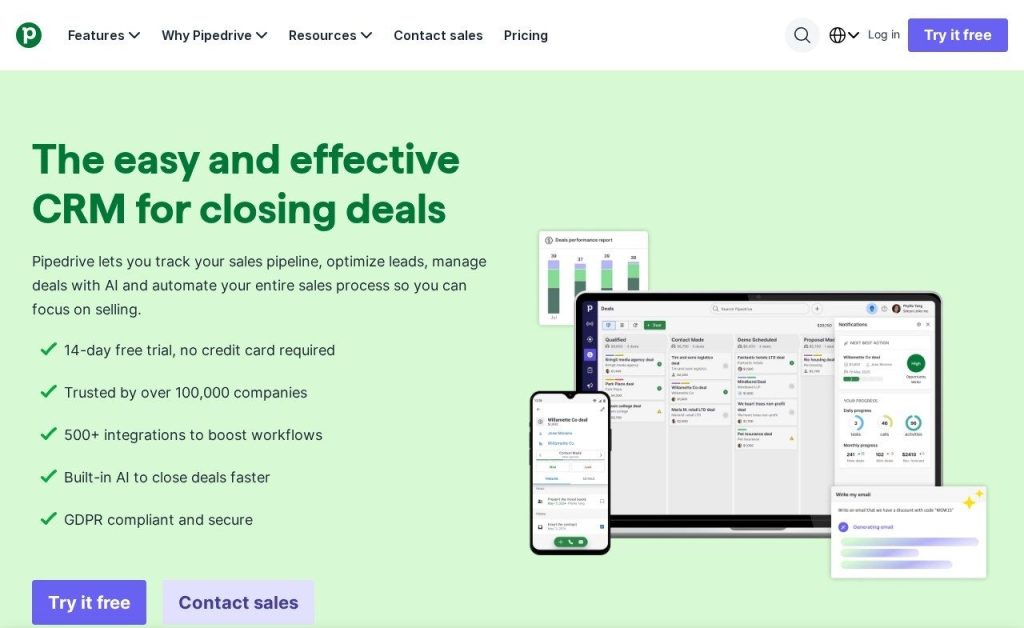
Pipedrive is a CRM built only for selling. Your deals sit as cards in columns, and you drag each one forward as it moves from lead to won. Every plan includes customizable pipelines, 500+ integrations and a 14-day free trial with no credit card.
A 4-person roofing company could set up stages from quote sent to job booked, have Pipedrive remind each rep to follow up, and send a 3-email sequence to every new quote on the $39 Growth plan.
Key Capabilities
- Visual pipeline: Drag-and-drop deal stages on every plan, with deal rotting alerts so nothing goes cold.
- Automations and sequences: 50 automations and 5 sequences on Growth, rising to 250 and 50 on Ultimate.
- Nova: Meeting briefs, call recording and transcripts, and suggested CRM updates, included on all plans.
- LeadBooster: Chatbot, live chat, web forms and Prospector, included from Premium.
- Email sync and tracking: Full two-way email sync with open tracking from Growth.
Pros
- Easiest pipeline to set up and update
- Automations and sequences at $39 a seat
- Free migration from HubSpot via Import2
- No onboarding fees
Cons
- No free plan
- Lite has no email sync or automations
- Reporting is more basic than HubSpot’s
- Lead tools are add-ons below Premium
Plans & Pricing
- Free trial: 14 days on any plan. No credit card needed.
- Lite: $14/seat/month (billed annually). Pipeline management, AI report creation, 15 reports per user.
- Growth: $39/seat/month (billed annually). Full email sync, 50 automations, 5 sequences, forecasting, meeting scheduler, live chat support.
- Premium: $59/seat/month (billed annually). Lead routing, scoring, enrichment, e-signatures, AI email tools, LeadBooster included, phone support.
- Ultimate: $79/seat/month (billed annually). Security rules, sandbox, phone and email enrichment, 250 automations.
- Monthly billing: Costs more; Pipedrive says annual billing saves up to 42%.
Pricing: HubSpot vs Pipedrive
HubSpot is cheaper to start, and Pipedrive is cheaper once you need automation. As of November 2026, HubSpot Starter costs $7 per seat a month on annual billing for new customers, against $14 for Pipedrive Lite. Sequences and forecasting cost $39 per seat on Pipedrive Growth, but $90 per seat plus a required $1,500 onboarding fee on HubSpot Sales Hub Professional.
- Solo owner or team of 2: HubSpot Free costs $0. Pipedrive Lite costs $28 a month for 2 seats.
- Team of 5, basic CRM: HubSpot Starter costs $35 a month ($100 at list price). Pipedrive Lite costs $70.
- Team of 5 with sequences: Pipedrive Growth costs $195 a month. HubSpot Professional costs $450 a month plus $1,500 up front.
Keep in mind HubSpot’s $7 Starter price is a limited-time offer, and the list price is $20. Pipedrive bills every seat you buy, even an empty one, while HubSpot gives you free view-only seats.
Tie: HubSpot wins for a tiny team on a tight budget, while Pipedrive gives a growing sales team far more automation for the money.
Ease of Use
Pipedrive is the simpler tool. It does one job, so new reps see their deals the moment they log in and can start dragging cards on day one. On G2, Pipedrive scores 8.7 out of 10 for ease of setup against 8.3 for HubSpot.
HubSpot is friendly too, and both tools score 8.7 for day-to-day ease of use on G2. But HubSpot does far more, and reviewers often mention a learning curve once you start adding workflows, hubs and settings.
Winner: Pipedrive, because a small sales team can be fully set up in an afternoon.
AI Features
HubSpot gives you more AI, and some of it is free. Breeze Assistant can research companies, prep you for sales calls and summarize records, even on the free CRM. Paid plans include monthly HubSpot Credits (500 on Starter, 3,000 on Professional) that power agents like the Prospecting Agent and Customer Agent.
Pipedrive includes Nova on every plan at no extra cost, which writes pre-call briefs, records and transcribes calls and drafts CRM updates. Its AI import assistant and AI report builder are also on every plan, but AI email writing and email summaries start on Premium at $59.
Winner: HubSpot, because its AI assistant and agents reach further across sales, marketing and service.
Pipelines and Automation
This is Pipedrive’s home turf. Its visual pipeline is the reason most teams choose it, and Growth includes 50 automations, 5 email sequences and forecasting at $39 per seat. Premium raises that to 150 automations and 25 sequences.
HubSpot Starter gives you up to 15 pipelines and up to 50 basic workflows, but no sequences or forecasting. Professional adds 300 workflows, sequences of up to 500 emails per user a day and custom forecasts, and it is more powerful at that level, but it costs more than twice as much per seat.
Winner: Pipedrive, because it puts real sales automation within reach of a small budget.
Integrations
HubSpot lists more than 2,000 app integrations, and its own marketing, service, content and commerce hubs plug straight into the same contact records. That makes it easy to build your whole customer stack in one place.
Pipedrive lists 500+ integrations, which covers the big names like Google Workspace, Microsoft 365, Slack, Zoom and Mailchimp. Some reviewers say they need paid connectors like Zapier for less common apps.
Winner: HubSpot, because it connects four times as many apps and has its own marketing tools built in.
Free Plan, Trial and Support
HubSpot’s free CRM never expires and needs no credit card. Free users get community help and HubSpot Academy, Starter adds email support, and Professional adds phone support.
Pipedrive has no free plan, but its 14-day trial opens any plan without a card. Lite includes chatbot help and tutorials, Growth adds live chat, and Premium and Ultimate add phone support.
Winner: HubSpot, because you can use its CRM for free for as long as you like.
Which Should You Choose?
- If you’re a solo owner or a team of 2, pick HubSpot and start on the free CRM.
- If you want marketing emails, forms and a CRM in one place, pick HubSpot.
- If your team spends its day chasing deals, pick Pipedrive for its visual pipeline.
- If you need email sequences on a small budget, pick Pipedrive Growth at $39 a seat.
- If you want the most AI help without paying extra, pick HubSpot.
- If you’re already on HubSpot Free and only need a sales pipeline, try Pipedrive with the free Import2 migration.
Not Sold on Either?
Zoho CRM, Freshsales and Less Annoying CRM cost less and still cover the basics well. Compare them in our guide to the best CRM software for small businesses, or see our list of the best HubSpot alternatives.
FAQs
Is Pipedrive cheaper than HubSpot?
At the entry level, no. HubSpot has a free CRM and a Starter plan from $7 per seat a month on annual billing, against $14 for Pipedrive Lite as of November 2026. Once you need sequences, Pipedrive Growth at $39 per seat is far cheaper than HubSpot Professional at $90 plus a $1,500 onboarding fee.
Does Pipedrive have a free plan?
No. Pipedrive offers a 14-day free trial on every plan with no credit card, then the cheapest plan is Lite at $14 per seat a month on annual billing.
Is HubSpot CRM really free?
Yes. HubSpot’s free tools cover up to 2 users with no time limit and no credit card. Emails sent from the free plan carry HubSpot branding.
Which is easier to use, HubSpot or Pipedrive?
Pipedrive is easier to set up because it only does sales. On G2, both score 8.7 for ease of use, while Pipedrive leads on ease of setup with 8.7 against 8.3.
Can I move from HubSpot to Pipedrive?
Yes. Pipedrive’s built-in Import2 tool migrates HubSpot data for free up to 1,000,000 records, and Pipedrive publishes a step-by-step HubSpot migration guide.
Which is better for a small business, HubSpot or Pipedrive?
HubSpot suits most small businesses because it starts free and covers marketing too. Pipedrive is the better pick for a team whose main job is closing deals.
Final Thoughts
Open a free HubSpot account and a 14-day Pipedrive trial this week, then add your 10 most active deals to both. Whichever one your team keeps updating without being asked is the right CRM for you.
Still comparing tools? See our picks for the best CRM software for small businesses, or read about the best AI lead generation tools.